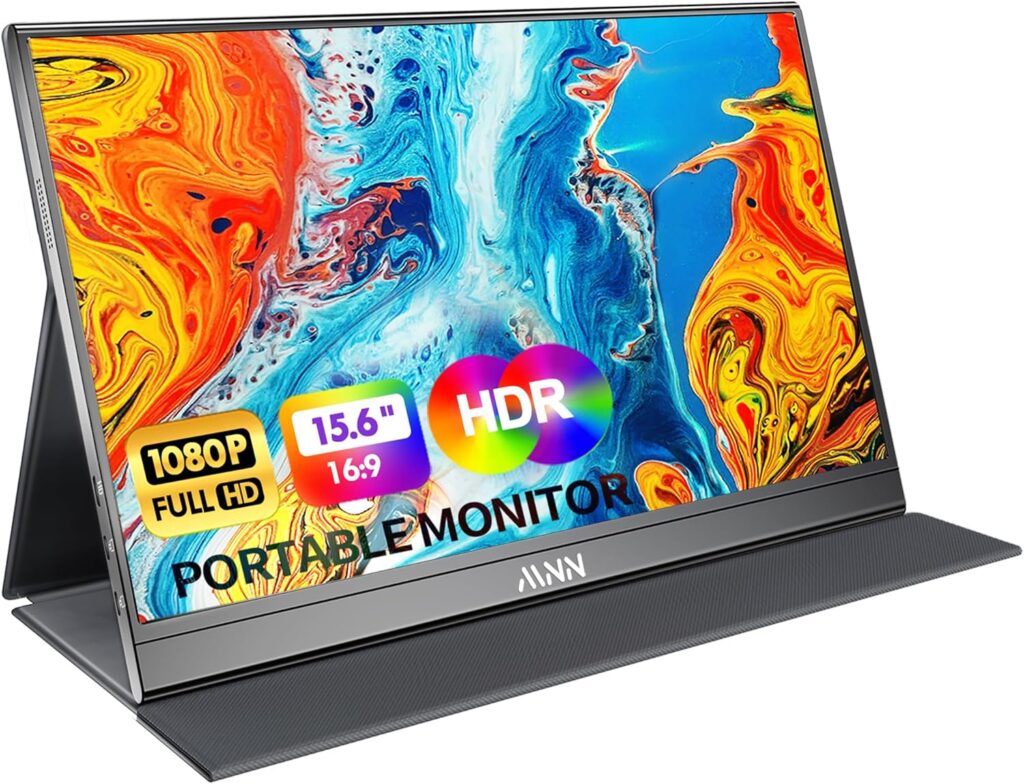
For decades, the “dual-monitor setup” was a luxury reserved for those anchored to a massive desk in a corporate office. But as the world shifted toward remote work and digital nomadism, the limitation of a single laptop screen became a significant bottleneck for productivity. We lost time switching between tabs, squinting at split screens, and struggling to manage video calls while looking at data. The MNN 15.6″ Portable Monitor has effectively shattered that barrier. It is a razor-thin, high-definition second screen that fits in your backpack and powers up with a single cable. In this deep-dive review, we’ll explore the display technology, connectivity, and the sheer freedom this device offers to the modern professional.
Design and Build: The Zenith of Portability
The first thing that will shock you about the MNN monitor is its profile. At just 0.3 inches thick and weighing roughly 2 pounds, it is thinner and lighter than most tablets. It doesn’t feel like a bulky piece of hardware; it feels like a high-end folder.
- Premium Construction: The frame is sleek and minimalist, maximizing the screen-to-body ratio.
- The Smart Cover: It comes with a durable magnetic “Smart Cover” that serves two purposes: it protects the screen during transit and folds back to act as a versatile stand, allowing you to prop the monitor up at various viewing angles.
- Travel-Ready: Because it matches the 15.6-inch standard of most laptops, it slides perfectly into the same laptop sleeve or backpack compartment you already use.
Display Quality: Vibrant Full HD Clarity
A portable screen is only useful if it’s pleasant to look at. MNN has equipped this unit with an Advanced IPS Panel that delivers a stunning 1080P Full HD resolution.
- Color Accuracy: With a high color gamut and a 1000:1 contrast ratio, the colors are vivid and blacks are surprisingly deep for a portable unit. This makes it suitable not just for spreadsheets, but for photo editing and media consumption.
- 178° Viewing Angle: Thanks to the IPS technology, you can look at the screen from almost any side angle without the colors washing out—perfect for showing a client a presentation across a table.
- Eye Care Technology: The monitor features “Low Blue Light” and “Flicker-Free” settings. For those of us pulling 10-hour shifts, this is a vital health feature that significantly reduces eye strain and headaches.
Connectivity: The “One-Cable” Magic
In the past, monitors required a power brick and a video cable. MNN utilizes the latest USB-C technology to simplify your life.
- USB-C Full Functionality: If your laptop has a “Full-Function” USB-C port (Thunderbolt 3 or 4), you only need one cable. This single cord transmits the video signal and provides power to the monitor directly from your laptop. No wall outlet required.
- Mini HDMI Support: For older laptops, gaming consoles, or cameras that don’t support USB-C video, the monitor includes a Mini HDMI port. In this setup, you’ll just need to plug the monitor into a power source (like a power bank or a phone charger).
- Plug and Play: There are zero drivers to install. Whether you are on Windows, macOS, ChromeOS, or Android, it works the second you plug it in.
Gaming and Entertainment: Beyond the Office
While it’s a productivity beast, the MNN monitor is also a secret weapon for gamers. It turns your Nintendo Switch, PS5, or Xbox into a portable arcade.
- Responsive Refresh: With a standard 60Hz refresh rate and quick response time, gaming feels fluid without noticeable input lag.
- Built-in Dual Speakers: For a device this thin, the integrated speakers provide decent stereo sound, making it a self-contained entertainment unit for watching movies in a hotel room or playing games on the go.
- HDR Mode: You can toggle HDR (High Dynamic Range) in the settings to enhance the visual depth of your games and videos, making colors “pop” and shadows more detailed.
Use Cases: Transforming Your Workflow
How does the MNN monitor actually change your day-to-day life?
- The “Zoom” Professional: Keep your video call on the laptop screen and your notes or presentation on the MNN screen. No more fumbling between windows while people are watching you.
- The Coder/Developer: View your code on one screen and the live preview or documentation on the other. It’s an instant efficiency boost of at least 30-50%.
- The Traveling Salesman: Turn the monitor toward your client to show them a demo while you keep your private notes visible on your laptop.
- The Student: Research on the portable monitor while writing your essay on the main screen.
Versatility: Landscape or Portrait?
One of the most underrated features is the ability to switch between Landscape and Portrait modes. By simply changing the display settings in your OS, you can stand the monitor vertically. This is a “dream setup” for writers, legal professionals reading long PDF documents, and programmers who want to see more lines of code at once. The Smart Cover easily adjusts to support either orientation.
Value Analysis: The Most Affordable Luxury
If you were to buy a second monitor from a big-name brand like Dell or ASUS, you might pay double the price for similar specs. MNN has managed to carve out a massive market share by offering premium display quality at an entry-level price.
When you consider the cost of a high-end tablet (which often can’t function as a true second monitor for a laptop), the MNN monitor is an incredible bargain. It is a dedicated tool that does one thing—provide extra screen real estate—and it does it with professional-grade reliability.
Who is this Monitor For?
- Remote Workers: Those who want to work from a balcony, a kitchen, or a café without losing their office efficiency.
- Digital Nomads: People who travel light but need a dual-screen setup for serious work.
- Gamers: Anyone who wants to play console games in places where there is no TV.
- Photographers/Videographers: Use it as a larger “field monitor” to check focus and colors while shooting.
Final Verdict: Your Desk, Anywhere
The MNN 15.6″ Portable Monitor is a masterclass in modern utility. It addresses the fundamental flaw of the mobile workstation—screen space—and does so without adding weight or complexity to your life.
It is sharp, vibrant, easy to connect, and incredibly durable. In a world where time is money, the ability to double your workspace in three seconds is an investment that pays for itself in the first week. If you are tired of the “single-screen struggle” and want to reclaim your productivity while enjoying the freedom of the road, the MNN monitor is the smartest upgrade you can make for your setup in 2026. It doesn’t just expand your screen; it expands your possibilities.
 View on Amazon